
Download JSON Editor – Free, Secure & Powerful JSON Tool for Windows, Mac, iOS & Android
Introducing JSON Editor: The Ultimate Free Tool for Developers and Data Enthusiasts
In the world of modern web development and data integration, JSON (JavaScript Object Notation) has become the de facto standard for data exchange. Whether you're building APIs, debugging applications, or managing configuration files, having a reliable JSON editor is essential. That’s where JSON Editor for Windows comes in—a lightweight, free, and user-friendly application designed specifically for developers, testers, and anyone who works with structured data.
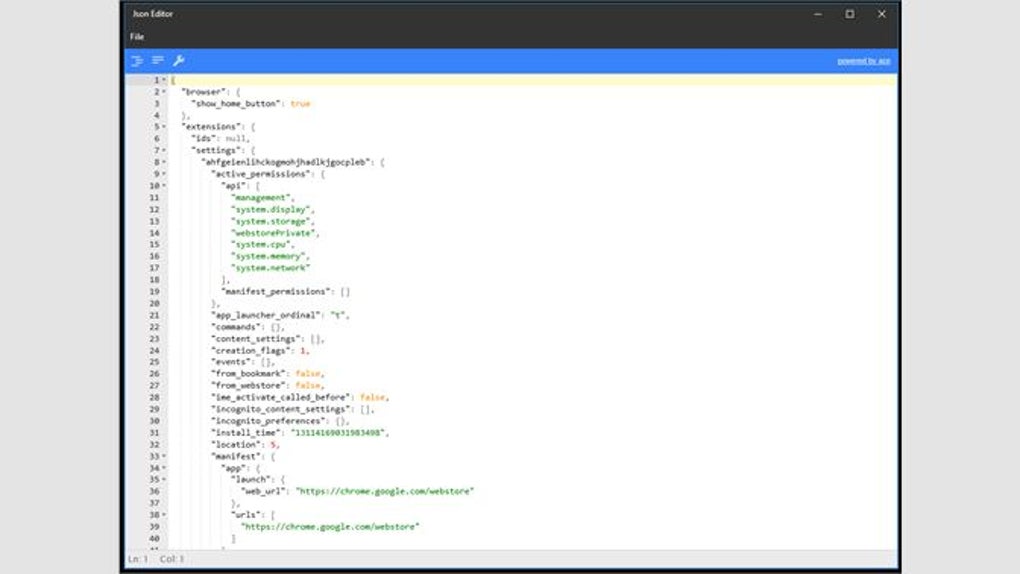
Based on the popular iOS version, this desktop tool ensures seamless file sharing across devices, making it ideal for teams that use multiple platforms. The clean, intuitive interface prioritizes usability without sacrificing power. With syntax highlighting, real-time validation, and a robust search function, editing JSON files becomes fast, accurate, and stress-free. Whether you're a beginner learning JSON or a seasoned developer managing complex configurations, this tool adapts to your workflow.
One of the standout features is its ability to validate JSON structure instantly. If your file contains syntax errors, the editor highlights them in real time, helping you catch mistakes before they cause issues in your application. The search functionality is also highly efficient—allowing you to find specific keys, values, or nested objects in seconds. Plus, with support for multiple platforms including Windows, Mac, iOS, and Android, you can work on your files wherever you are.
Best of all? It’s completely free to download and use. No hidden fees, no watermarks, no trial limits. Just a secure, up-to-date tool that keeps your data safe while enhancing productivity. If you're looking for a no-frills, high-performance JSON editor that just works, JSON Editor is a top contender.
Powerful Features That Make JSON Editing Effortless
What sets JSON Editor apart from other tools is its thoughtful combination of simplicity and advanced functionality. Here’s a breakdown of the key features that make it a must-have in your development toolkit:
- Real-Time Syntax Highlighting – Automatically colors keys, values, strings, and numbers for improved readability and faster parsing.
- Instant JSON Validation – Detects malformed syntax immediately and highlights errors with clear feedback.
- Advanced Search & Replace – Find any key, value, or pattern across nested structures with powerful filtering options.
- Tree View & Flat View Modes – Switch between hierarchical tree representation and flat list for better navigation.
- Auto-Formatting & Beautification – Clean up messy JSON with a single click, ensuring consistent structure and readability.
- File Sharing Across Platforms – Sync your JSON files between Windows, Mac, iOS, and Android thanks to the shared iOS foundation.
- Lightweight & Fast – Minimal resource usage ensures smooth performance even with large JSON files.
- Secure Local Processing – All data remains on your device; no cloud upload or third-party access.
These features are not just nice-to-haves—they’re game-changers. For example, the tree view mode makes it easy to navigate deeply nested objects, while the search function can locate a specific key across thousands of lines in milliseconds. The auto-formatting tool is particularly useful when you receive unstructured JSON from third-party APIs or logs.
Another major advantage is the seamless cross-platform experience. Since the Windows version shares the same core codebase as the iOS app, you can edit a file on your iPhone, open it on your Windows PC, and continue editing without any compatibility issues. This is a huge win for remote teams and developers who switch between devices frequently.
Additionally, the editor supports drag-and-drop file loading, making it easy to open JSON files from your file explorer. It also remembers your last opened files, so you can pick up where you left off. Whether you're debugging an API response, configuring a backend service, or writing a new data schema, JSON Editor streamlines the entire process.
Easy Installation, Simple Usage – No Technical Skills Needed
Getting started with JSON Editor is a breeze. The installation process is quick, straightforward, and requires no technical expertise. Here’s how to get it up and running on your Windows PC:
- Download the Installer – Visit the official website and download the latest version of JSON Editor for Windows. The file is small (under 10MB) and safe to download.
- Run the Setup – Double-click the downloaded .exe file and follow the on-screen instructions. No complex configurations or additional software required.
- Launch the App – Once installed, open the application from your Start menu or desktop shortcut.
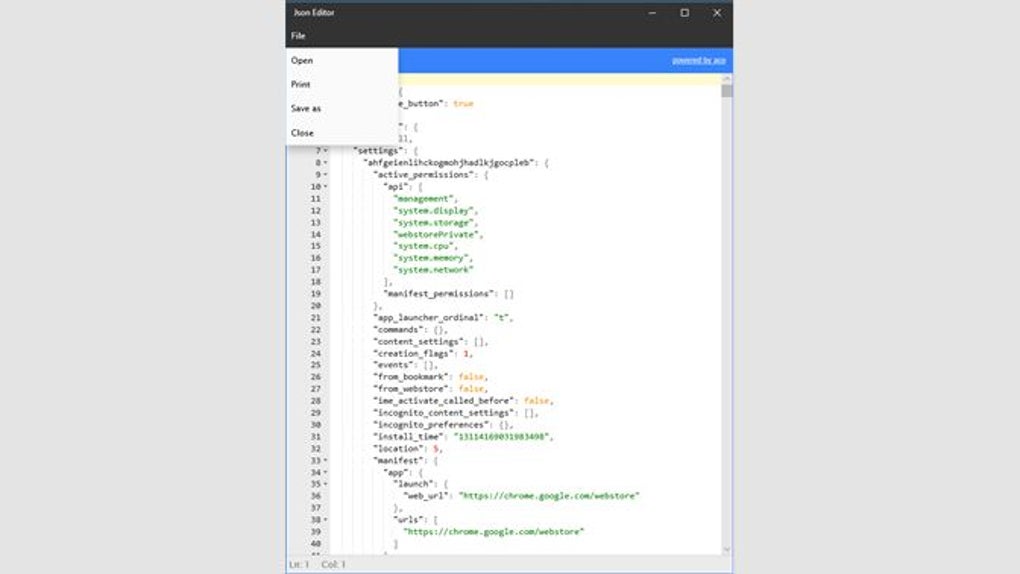
- Open a JSON File – Drag and drop your JSON file into the editor, or use the “File > Open” menu to browse your system.
- Start Editing – Use the intuitive interface to view, edit, and validate your data. The real-time feedback ensures accuracy.
For users on Mac, iOS, or Android, the installation process is equally simple. The app is available through official app stores or direct downloads, ensuring broad accessibility. The interface remains consistent across platforms, so you’ll feel right at home no matter which device you’re using.
Once open, the editor presents a clean layout with a sidebar for navigation and a main pane for editing. You can toggle between tree and flat views with a single click, and the search bar is always accessible. The tool also supports keyboard shortcuts for common actions like formatting, saving, and searching, which boosts efficiency for power users.
Updates are delivered automatically through the app or via the website. This ensures you always have the latest bug fixes, performance improvements, and security patches. With regular updates and a strong focus on user experience, JSON Editor stays ahead of the curve without ever becoming bloated.
Compatibility & System Requirements: Works on All Major Platforms
JSON Editor is designed for maximum compatibility, supporting a wide range of operating systems and devices. Whether you're using a Windows PC, Mac laptop, iPhone, or Android tablet, you can access and edit your JSON files seamlessly.
Operating Systems Supported:
- Windows: 7, 8, 10, and 11 (64-bit recommended)
- Mac: macOS 10.14 (Mojave) and later
- iOS: iPhone and iPad running iOS 13 or higher
- Android: Android 8.0 (Oreo) and later
The application is lightweight, requiring minimal system resources—just 50 MB of RAM and 100 MB of disk space. This makes it ideal for older machines or devices with limited storage. It doesn’t require admin rights to install, so it’s perfect for corporate environments with strict software policies.
One of the most valuable aspects of this compatibility is the ability to share files across devices. A JSON file edited on your iPhone can be opened on your Windows machine without any conversion or formatting loss. This is especially helpful for developers who work on the go or collaborate with team members using different platforms.
Additionally, the app supports both local and cloud-stored files. You can open JSON files from your local drive, network share, or cloud storage like Dropbox, Google Drive, or OneDrive. This flexibility ensures you can work with your data wherever it lives.
Pros and Cons: Is JSON Editor Right for You?
Pros
- ✅ Completely free to download and use
- ✅ Fast, lightweight, and responsive
- ✅ Real-time syntax validation and error detection
- ✅ Cross-platform sync between Windows, Mac, iOS, and Android
- ✅ Intuitive interface with tree and flat view modes
- ✅ Powerful search and replace functionality
- ✅ Secure—no data sent to the cloud
- ✅ Regular updates and strong community support
Cons
- ❌ No built-in export to other formats (like CSV or XML)
- ❌ Limited collaboration features (no real-time editing)
- ❌ No command-line interface for automation
- ❌ No built-in diff tool for comparing versions
Frequently Asked Questions (FAQ)
Is JSON Editor free to download and use?
Yes, JSON Editor is completely free to download and use on Windows, Mac, iOS, and Android. There are no hidden costs, subscription fees, or trial limitations. You can use it for personal, educational, or professional projects without any restrictions.
Can I edit JSON files on my iPhone and open them on Windows?
Absolutely! Since the Windows version shares the same codebase as the iOS app, your JSON files are fully compatible across devices. You can edit a file on your iPhone, save it, and open it on your Windows PC without any formatting issues.
Does JSON Editor support large JSON files?
Yes, the editor is optimized for performance and can handle large JSON files efficiently. It uses lazy loading and memory-efficient parsing to ensure smooth operation, even with files over 100 MB.
Is my data safe when using JSON Editor?
Yes, all data processing happens locally on your device. No files are uploaded to the cloud or shared with third parties. Your JSON files remain private and secure at all times.
How often are updates released?
Updates are released regularly—typically every 4–6 weeks—to fix bugs, improve performance, and add new features. The app checks for updates automatically, so you always have the latest version.
Final Verdict: A Must-Have Free Tool for JSON Work
If you work with JSON files—whether you're a developer, QA tester, data analyst, or tech enthusiast—JSON Editor is an essential tool that delivers on both simplicity and power. With its clean design, real-time validation, cross-platform compatibility, and zero cost, it stands out as one of the best free JSON editors available today.
While it lacks some advanced features like collaboration tools or export to other formats, its core functionality is flawless. For anyone who needs a reliable, secure, and fast way to view, edit, and format JSON, this app is hard to beat.
Download JSON Editor now and experience a smarter way to work with structured data. Whether you're debugging an API, configuring settings, or learning JSON, this free tool will make your life easier.







